• Home
  • Software Testing Service
  • About US
    • Privacy Policy
    • Disclosure
  • Write For Us
  • Submit Software
  • Contact Us
    • Subscribe
I Love Free Software
Best free software available all over the web. The free software categories include Windows Software, Social Networking Tools, and software installation videos.


  • Featured
  • Windows
  • Web Applications
  • App Store
  • Android
  • iPhone
  • iPad
  • Windows 8
  • Social Networking
  • Programming Tools

Proxy Switchy Extension for Google Chrome

By Ishan Bansal on January 7, 2011 | Sponsored Links

Proxy Switchy is another quite useful extension for Google Chrome. Proxy Switchy, as the name suggests, allow users to connect and manage their proxies in a quick and efficient way.

Proxy Switchy allows the users to activate the proxy only for certain pages, quickly cycle through profiles and other many great features. With a colorful menu Switchy!, once properly configured, will sure be useful if one does not want to be monitored or don’t want to live an online track.

Also, Proxy Switchy will allow you to have access to websites which under normal circumstances would be blocked. It doesn’t matter if you’re at work or at school, access your favorite social networking sites with Switchy!.
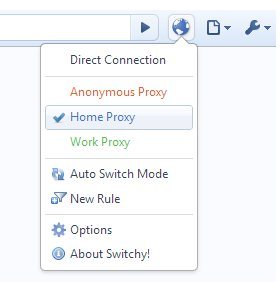
Proxy Switchy Chrome Extension
Sponsored Links

How to Use Proxy Switchy Extension for Google Chrome:

First thing that should be said is that Switchy! is not easily configured. If you have no idea of what is a proxy please read a bit more about it before you use this extension. Warnings aside, once installed a tab should open automatically asking you to configure the extension. First thing you should do is give your profile a name. After doing so you should configure the proxy, either manually or automatically. Once you’re done you’re free to explore the other tabs. If you desire you can set rules to when a certain proxy will be used. To do that just go to the rules tab and choose to create a new rule, set them according to your preferences. You can also create several profiles, just go back to the profiles page and click “New Profile”.

Also check out other Google Chrome Extensions.

Features of Proxy Switchy Extension for Google Chrome:

  • Have full access to blocked sites.
  • Hide your online track.
  • Quickly cycle through multiple profiles.

Download Proxy Switchy extension for Google Chrome here.

Home Page: Click Here
Works With: Google Chrome
Free / Paid: Free

Link to This Page:


You Might Also Like:

  1. Free Chrome Extension To Browse Anonymously: GeoProxy
  2. Shareaholic Google Chrome Extension
  3. Google Offers Extension For Google Chrome
  4. Tarot.com Chrome Extension to See Daily Horoscope in Chrome
  5. Browse Anonymously On Your Google Chrome: Stealthy

Be the first to know about Latest Free Software:

  • Join us on Facebook
  • Subscribe to our RSS Feed
  • Follow us on Twitter
  • Subscribe to Email Updates:

Posted in Plugins | Tagged google chrome extension | Leave a response

Ishan Bansal

« Previous Next »

Featured Posts

  • Top 7 Free Launchers for Android
  • 5 Free Snippet Managers To Manage Code Snippets
  • 5 Free Online Tools To Test Website In Different Resolutions
  • 5 Free Microsoft Access Alternatives
  • 5 Free IP Notifier Apps
  • 5 Online Mapping Websites
  • 5 Free Alternatives To iGoogle
  • 7 Websites To Download Windows 8 Themes

Join More than 15,000 Followers!

Enter your Email Address
  • Submit Software
  • Software Testing Service
  • Write For Us
  • About Us
  • Privacy Policy
  • Disclosure
  • Contact Us

Link to Us:

Did we review your software here? Feel free to flaunt this badge on your website:

Free Software

Use this Code:

Copyright © 2013 I Love Free Software.

Powered by WordPress and Hybrid. New - H