PStart is a free app launcher that enables the user to start defined programs quickly and efficiently. Indeed you may think of this free quick launch menu as another start menu. The software is primarily designed to run portable applications, the likes of portable Firefox and Thunderbird but can also be used on a local system.
This handy tool is ideal for starting programs from USB key devices and removable disks. Installing PStart to either your hard disk or a USB stick will give you the options of having, as mentioned above, as extra start menu on your computer and of having a mobile device which will enable you to open portable documents and folders.
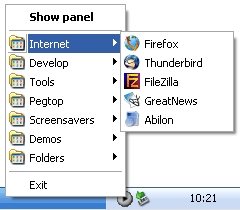
PStart is designed to make use of, something called, “relative paths”. This means that when installed on a portable device, the program will function on another computer regardless of the drive-letter. It is because of the aforementioned “relative path” design that you are able to, for example, start programs that have been burned to a CD as well as a slew of other applications.
As technology continues to develop and portability becomes more and more popular with the masses, handy and easy-to-use starting applications, like PStart will become more of a necessity. Indeed portable versions of, the above-mentioned, Firefox and Thunderbird are already creeping into the computer mobile world.
Also check out other free app launchers and mac style toolbar for Windows 7.
PStart allows you to access and start all items easily from the application’s tray menu. As this tray menu is easily configurable, you are able to create defined folders and sub-folders. You are also able to configure the mouse and hot keys to allow the menu to pop-up without having to click on the tray icon. Making use of the incremental search option, lets you activate all programs on your hard disk or portable device, quickly and effortlessly. All search results are displayed in various predefined colors. Double clicking on the “Initiate Search” button on the try icon, locates all applications speedily.
PStart also allows you to write and store short notes or memos which you may carry with you on a USB drive. Each memo or note is able to be color coded and has a “reminder” feature that can be set. When the “reminder” option is set, you will receive notification each time PStart is activated. There are other features in this application activation software that are designed to make your computing activities so much easier.
Download PStart free.
