Psykopaint is a very interesting freeware which can convert pictures to paintings. Psykopaint lets you crazily paint your stuff, and convert any picture to a beautiful painting. For those, who are mad over painting and want to try their hands on painting crazy stuffs, Psykopaint is the right place. It offers you to convert your picture into crazy painting, paint any picture from gallery, or create your own painting.
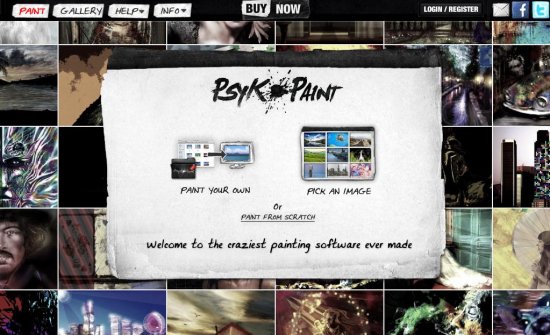
The whole process is very simple. Just select the picture that you want to convert, and choose one of the many tools available, and you are done. That’s it.
Getting Started with Psykopaint:
Psykopaint is a web based application. In order to use the facility you need to make an account and get registered with Psykopaint. You can use Psykopaint without making an account, but this won’t allow you to avail the special features offered by Psykopaint. After getting registered with Psykopaint, you will be able to use all the amazing painting tools and extra facilities offered by Psykopaint.
Welcome to the Crazy World of Psykopaint:
After making an account with Psykopaint, you can start painting crazy stuffs with your pictures. The moment you enter Psykopaint, you will find a very impressive, comic sort of interface which prompt you to further explore the world of Psykopaint.
Psykopaint offers six different types of brushes which you can use to paint your stuff. Psykopaint picks colors from your picture and automatically apply it the paint brush. These brushes offers some presets which apply different stroke style to your painting brush. But all these painting brushes are not free. Let’s find out how you can get all these brushes to make your paintings more impressive.
How can I use unique painting brushes on Psykopaint?
Psykopaint is more or less like a video game, where you earn points and get some gadget or weapon against those points. Here also, you need to earn points to use some of these special painting brushes.
How can I earn Points on Psykopaint?
Making an account with Psykopaint gets you 10 bonus points in advance. For more points you need to make beautiful, crazy paintings and publish them on Psykopaint gallery. There, the more page views you get, the more points you will earn. Its as simple as that!
Convert Pictures to Paintings with Psykopaint:
With Psykopaint, you can convert your pictures into beautiful paintings, paint some image from Psykopaint gallery, or create your own paintings. As I have mentioned earlier, you can use six different types of brushes, plus an eraser tool, but you need to earn points to use them all. You can try these brushes, but the changes you make in your painting in trail mode will not be saved to the final output. However, in the beginning you can try your hands on painting with the basic brush available. You can select a preset (style of brush stroke), set the size the opacity of the brush stroke, and start painting your picture. There’s nothing to write much about it; the more you try, the more you understand, and the more you realize how much fun it is to convert your pictures to crazy paintings using Psykopaint.
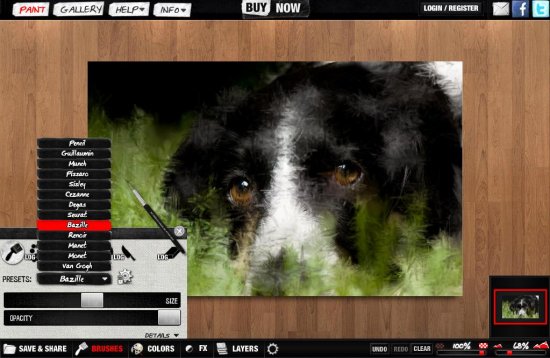
Apart from that, you can pick solid colors from the color palette to apply a brush stroke in a particular color. Also, it has some inbuilt filters which gives a new look to your picture. You can also increase or decrease the brightness of the pictures if you want.
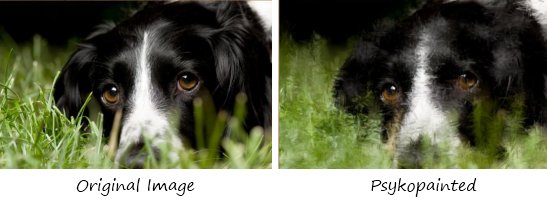
Key Features of Psykopaint:
- Online Painting Tool: Psykopaint is an online painting tool which can convert your pictures into amazing paintings.
- Unique Brushes: It offers six different kind of brushes to beautify your pictures in most unique ways.
- Presets: Every brush has some presets which apply a definite stroke style to your brush and gets you the desired painting style.
- Filters: It has some real time filters which applies regular brightness, contrast, hue/saturation, and lightning effects to your pictures.
- Layers: It offers you to apply layers to your pictures and provide blending options for them.
- Save, Send, or Print Paintings: You can save your paintings to your computer, take a print out, or send them to your friend.
- Share Paintings: Psykopaint allows you to post your paintings immediately on your Facebook wall, or share them on Twitter.
- Record and Play: You can record a painting sequence and play it to have a back-to-back look.
Also check our reviews on 5 best free online image editors to edit images online.
The Final Verdict:
Psykopaint is really easy, require no special painting skills, and is absolutely free. The best part is that you do not need to download or install anything. Everything is totally web based. However, here is the another interesting feature: despite being web based, everything is client side. So, the whole process is very fast, and you do not need to actually upload the photo and download it back.
Try out Psykopaint here. You will love it!
