EagleGet is a free download manager and accelerator for Windows which you can use in order to quickly and easily download files, but not just files, you can also download online streaming videos. It comes with plugins and addons for all the major web browsers which will allow you to directly start file download from there, without having to copy links.
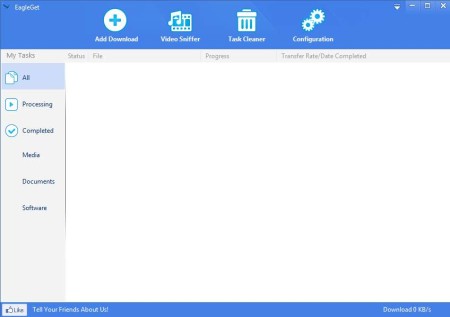
On the image above you can see the interface of EagleGet. It looks lightweight and it is lightweight, with less than 5MB in size. Left sidebar holds download groups. Files which are currently being downloaded will be placed in Processed. Completed will of course go to the Completed group. Division on file types is also possible, notices that Media, Documents and Software section near the bottom of the list. With the option at the top you can manually add download, manage task list, which is what the empty area down below is, and also access program preferences. Key features of EagleGet – free download manager and accelerator are:
- Free and easy to use file and video downloader with browser integration
- Supported browsers – Internet Explorer, Mozilla Firefox, Google Chrome
- Embeds download buttons on video websites – Metacafe, Vimeo, etc
- Clipboard monitoring – quickly add downloads by copying them to clipboard
- Improves download speed – optimizes connection to gain more speed
EagleGet has a lot more to offer, like for example support for proxies or system shutdown after downloads are completed. Download accelerator will help you out in case that you’re connection isn’t properly optimized.
Similar software: Kapere,BitSpirit, Down Tango.
How to improved download speeds, download videos and manage downloads with EagleGet
If you want to add downloads manually, from the main window, which can be seen on the image above, you need to click on the Add Download button. To download any other file while you’re browsing you just need to copy the link to clipboard, or in case of a video sharing site, click on the Download button that will appear next to the video window.
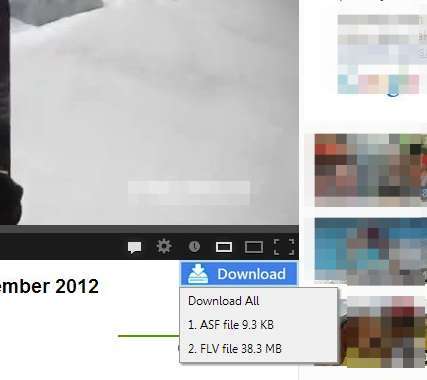
Depending on the video that you’ve decided to download, you’re gonna see several file types, MP4, FLV, or you can download audio. Select one from the list and click OK to confirm the download.
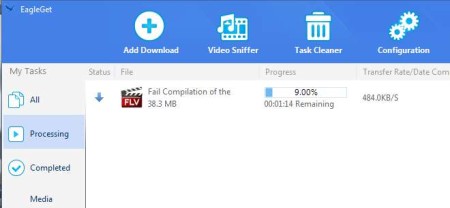
File will be added to the list, where you can keep track of download progress. Download acceleration and optimization was also noticeable, speeds were stable without any major slowdowns. To find the file that you’ve decide to download, you’re gonna have to open up the download directory, which can be set by clicking on Configuration from the top menu, among other things.
Conclusion
Downloading files with EagleGet is very easy. Other file types can also be downloaded, documents, archives, software, everything, there’s of course no limitation. Whatever it is that you need to copy, simply copy it to clipboard, click OK to confirm the download and you’re done. Lot’s more features are available so make sure to give EagleGet a try. Free download.
