• Home
  • Software Testing Service
  • About US
    • Privacy Policy
    • Disclosure
  • Write For Us
  • Submit Software
  • Contact Us
    • Subscribe
I Love Free Software
Best free software available all over the web. The free software categories include Windows Software, Social Networking Tools, and software installation videos.


  • Featured
  • Windows
  • Web Applications
  • App Store
  • Android
  • iPhone
  • iPad
  • Windows 8
  • Social Networking
  • Programming Tools

Download Folderico – Freeware to Change Folder Colors

By Anvin on May 6, 2010 | Sponsored Links

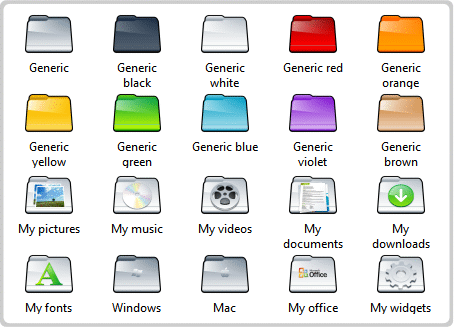
Folderico is a free software that lets you change colors of folder icons right from the context menu. Even if you connect your hard disk to any other computer, the folder icons that you have modified will still remain unchanged.

Sponsored Links

When you change colors of folders, you will be able to organize and handle folders in a better way. For instance, you can change the color of your work folders to Blue color. This will help you in easily locating the folders you are looking for. We had already discussed how to organize icons in form of stacks; changing folder colors is yet another way of organizing your folder icons better.

Also Read:

  • 4 Free Desktop Managers that Add 3D Effect to Desktop
  • 3 Free Software to Get Mac Style Toolbar on Windows 7

This free software to change folder colors has a very simple interface. On the website of the Folderico, you can find icons based on different themes; you can download and install these themes to give your folder icons a unique look. Folderico will also provide you with details on how to make your own theme ICL file.

Here are the features of this Free Software to Change Folder Colors:

  1. It is a very easy to use software for changing color of folder icons.
  2. Even if you connect the hard disk containing modified folder icons to another computer, the icons will remain unchanged even though the Folderico is installed in that computer.
  3. Folderico even allows you to restore the normal color of the folder by a single click.
  4. Since it allows you to change the color of the folder icons, you will be able to organize your folders on the basis of priority.
  5. You can also make use of an icon to change the icon of the folder.
  6. You can preview the icon from the context menu.
  7. You can download Folderico themes for free.
  8. It also allows you to change the names of the folders to your language.

Folderico is a very easy to use, and completely free software to change folder colors. Folderico has version for both Windows 7, as well as Windows XP. However, the download process is quite nasty, and you have to go through multiple screens to download the file.

Home Page: Click Here
Works With: Windows 7, Windows XP
Free / Paid: Free

Link to This Page:


You Might Also Like:

  1. Folder Marker – Freeware to Change Folder Icon and Color
  2. Rainbow Folders – Freeware to Change Color of Folder Icons
  3. 3 Free Software to Change Colors and Icons of Folders
  4. Change Icons of Flash Drives, Hard Drives, Folders: Folder iChanger
  5. How To Change Folder Icon In Windows 8

Be the first to know about Latest Free Software:

  • Join us on Facebook
  • Subscribe to our RSS Feed
  • Follow us on Twitter
  • Subscribe to Email Updates:

Posted in Desktop Enhancement, Windows | Tagged organize icons | 1 Response

Anvin

  • Pingback: Folder Marker - Freeware to Change Folder Icon and Color | I Love Free Software

« Previous Next »

Featured Posts

  • Top 7 Free Launchers for Android
  • 5 Free Snippet Managers To Manage Code Snippets
  • 5 Free Online Tools To Test Website In Different Resolutions
  • 5 Free Microsoft Access Alternatives
  • 5 Free IP Notifier Apps
  • 5 Online Mapping Websites
  • 5 Free Alternatives To iGoogle
  • 7 Websites To Download Windows 8 Themes

Join More than 15,000 Followers!

Enter your Email Address
  • Submit Software
  • Software Testing Service
  • Write For Us
  • About Us
  • Privacy Policy
  • Disclosure
  • Contact Us

Link to Us:

Did we review your software here? Feel free to flaunt this badge on your website:

Free Software

Use this Code:

Copyright © 2013 I Love Free Software.

Powered by WordPress and Hybrid. New - H