Update 2022: This software no longer exists. We recommend you to use this tool now.
myTV is a free YouTube desktop player that allows the user to stream YouTube videos to the Desktop. The user can collect the Video channels and YouTube playlists of his choice and stream them on the system by simply Dragging and Dropping from the Web browsers. myTV is based on Adobe AIR, and can work on Windows, Mac, and Linux.
In a way the myTV freeware player acts as a personalized free Desktop TV to access and view all the favorite YouTube videos seamlessly. Additionally the user can also maintain lists and maintain their favorites by organizing them into different genres, links and categories. Plus, the user can share the videos online as a group and also post his comments and views about the videos along with updates.
Also check out freeware to watch TV on PC.
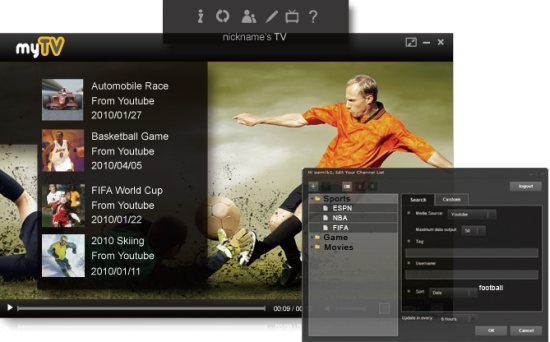
With myTV, the user can:
- Collect a list of TV channels online and even share them with others.
- Group the channels in various genres.
- Drag and Drop Video collection on to the Desktop.
- Organize the videos in different categories in 3 levels.
- Share the TV apps and the list of programs that are saved.
- Perform custom-editing of channels for personalization.
- Enjoy Viewing the videos in either full or mini-screen. Also the user has the option of viewing videos in full screenHD, when the user’s monitor is Full HD enabled.
- Personalize the appearance and feel of the WebTV using the options available.
- Use the list of controls and options available to get the best feel while viewing videos.
- Choose the video resolution according to the need and the bandwidth constraints.
- Editing the program list and the channels, adding or removing them, subscribing to new channels and updating them on the player by synchronizing is also possible.
- Get new channel data notification, adding YouTube links by Drag and Drop can also be done.
- Share the program lists and channels with friends via email.
- Use keyboard shortcuts to do all these.
All these make the myTV player, a useful utility. This is like your own desktop YouTube Home Theater. Also check out my favorite: Muziic desktop player.
myTV requires Adobe AIR player to be installed on the system. If not the installation will prompt the user to install Adobe AIR before going ahead with the installation of myTV.
