PC Audio Visualizer is a free audio tool which helps in visualizing audio sounds being played in or around your computer. It could be recorded directly from your sound card or any other audio source such as the speakers or the mic on your system. You can play with this software to visualize audio streams and check the display of sound which is played or heard around the system. It monitors the waveform behavior of the sound around a particular system.
Installing PC Audio Visualizer
In order to install the PC Audio Visualizer you need to download the setup file of the software to proceed. In order to download the file you will have to visit the developer’s website here and click on the download button. Once you click on it the download process starts and gets completed in couple of seconds. After you have the installer file on your system the next step is to run the setup process. The step by step process would ask you the details of the location where you wish to install the program which would take another couple of minutes. The last step is to launch the program which you could do from the shortcut present on your desktop. People interested to try some more useful audio tools can also try Soundation Music Studio, Roc and Vye Music.
Using PC Audio Visualizer
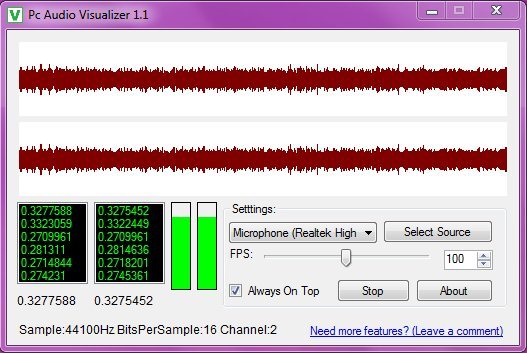
The tool is pretty simple wherein you need not do much to run and use the program. After it gets launched you would notice a new window appearing on your screen with a graph at the top and a few options below it.
As seen in the screenshot above the settings panel includes changing the source and the Frequency Per Second below that. You may check/uncheck the option of Always on Top so that the program remains on top while it’s active. Below you also have the option of stopping the record process or know more about this particular program from the ‘’About’’ option.
Left side has the frame sample which keeps on updating and records the waveform while noises on or around your system keeps playing. The program has been developed in such a manner that the process of recording starts as soon as the program is launched. In case you find that the program is not recording from the source listed you can select the device from the settings option and change the source of your audio feed.
Some features worth mentioning of PC Audio Visualizer:
- The program comes with a feature of displaying a waveform visualizer which starts from the left of the window towards the right channel.
- Gives you the option of device or the source selection which could be the mixer or the microphone or any other sources which your system might have.
- The program can be set to be always on top for avoiding being covered by any other window on your screen.
- It also comes with a sample value display and a vertical bar which gives you an instant display of the graphic that gets developed based on the waveform created from the sound around your system.
Now that you know all about PC Audio Visualizer, you can use this freeware to visualize any audio file you are playing on your PC.
