• Home
  • Software Testing Service
  • About US
    • Privacy Policy
    • Disclosure
  • Write For Us
  • Submit Software
  • Contact Us
    • Subscribe
I Love Free Software
Best free software available all over the web. The free software categories include Windows Software, Social Networking Tools, and software installation videos.


  • Featured
  • Windows
  • Web Applications
  • App Store
  • Android
  • iPhone
  • iPad
  • Windows 8
  • Social Networking
  • Programming Tools

Audacity: Free Audio Editor for Windows, Mac, and Linux

By Ishan Bansal on October 5, 2009 | Sponsored Links

Audacity: Free Audio Editor for Windows, Mac, and Linux
Audacity is a free and open source audio editor and recorder that works for Windows, Mac, and Linux. This is completely suitable for casual use, as well as advanced purposes, and gives a tough competition to expensive paid counterparts. Audacity has been able to gain a wide popularity because of the nice set of features, and rock solid performance. It has been designed well, and is constantly updated with new set of features. This ensures that this free audio editor and recorder remains a preferred choice of a very large set of users. If you just need casual mixing of tracks, you can try
Here are some of the features of Audacity:
Recording Capabilities
Audacity has pretty good recording capabilities.
It can record live audio through a microphone or mixer.
Level meters can monitor volume levels before, during, and after recording.
Can digitize recordings from cassette tapes, vinyl records, or minidiscs.
Can capture streaming audio.
Dub over existing tracks to create multi-track recordings.
Record up to 16 channels at once.
Import and Export
Audacity lets you start your working by importing sound files in multiple format. Following file formats are supported:
WAV, AIFF, AU, and Ogg Vorbis files.
MPEG audio (including MP2 and MP3 files) with libmad.
All file formats supported by libsndfile.
Raw (headerless) audio files.
You can edit the imported files, and even combine with other files. You can even combine the imported sound files with your new recordings.
Once you are done with your editing, Audacity lets you export your files in following formats:
Export WAV, AIFF, AU, and Ogg Vorbis files.
Export MP3s with the optional LAME encoder library.
All file formats supported by libsndfile.
Editing
Audacity provides easy to use editing features. Editing features range from simple cut/copy/paste, to more advanced one like fading the volume. Here is a quick summary of editing features provided by Audacity:
Easy editing with Cut, Copy, Paste, and Delete.
Use unlimited Undo (and Redo) to go back any number of steps.
Edit and mix an unlimited number of tracks.
Fast editing of large files.
Fade the volume up or down smoothly with the Envelope tool.
Use the Drawing tool to alter individual sample points.
—
Effects
Audacity provides following effects:
Remove static, hiss, hum, or other constant background noises.
Change the pitch without altering the tempo, or vice-versa.
Adjust volumes with Compressor, Amplify, and Normalize effects.
Alter frequencies with Equalization, FFT Filter, and Bass Boost effects.
You can also use built-in effects, such as: Echo, Phaser, Wahwah, and Reverse.
Sound Quality
Sample rates and formats are converted using high-quality resampling and dithering.
Record and edit 16-bit, 24-bit, and 32-bit (floating point) samples.
Mix tracks with different sample rates or formats, and Audacity will convert them automatically in realtime.
Record at up to 96 kHz.
Audacity is completely free and cross-platform.

Audacity is a free and open source audio editor and recorder that works for Windows, Mac, and Linux. This is completely suitable for casual use, as well as advanced purposes, and gives a tough competition to expensive paid counterparts. Audacity has been able to gain a wide popularity because of the nice set of features, and rock solid performance. It has been designed well, and is constantly updated with new set of features. This ensures that this free audio editor and recorder remains a preferred choice of a very large set of users. If you just need casual mixing of tracks, you can try Myna – browser based audio editor.
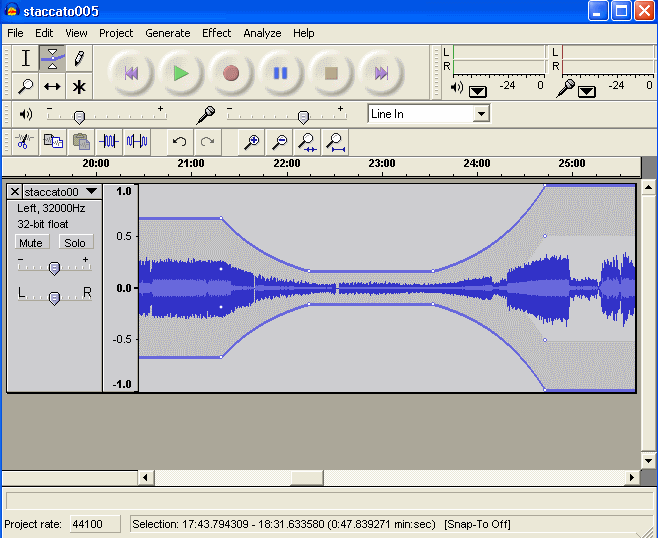
Audacity Free Audio Editor
Sponsored Links

Here are some of the features of Audacity:

Import and Export

Audacity lets you start your working by importing sound files in multiple format. Following file formats are supported:

  • WAV, AIFF, AU, and Ogg Vorbis files.
  • MPEG audio (including MP2 and MP3 files) with libmad.
  • All file formats supported by libsndfile.
  • Raw (headerless) audio files.

You can edit the imported files, and even combine with other files. You can even combine the imported sound files with your new recordings.

Once you are done with your editing, Audacity lets you export your files in following formats:

  • Export WAV, AIFF, AU, and Ogg Vorbis files.
  • Export MP3s with the optional LAME encoder library.
  • All file formats supported by libsndfile.

Recording Capabilities
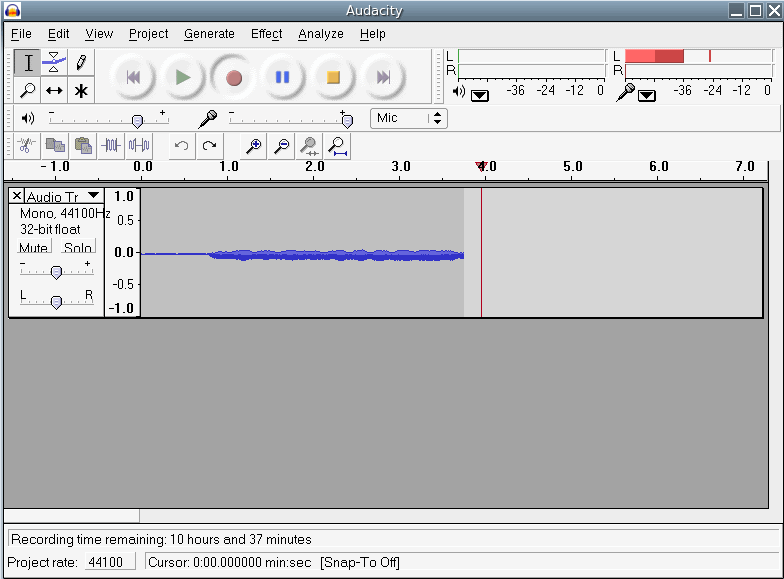
Record Audio with Audacity

  • Audacity has pretty good recording capabilities.
  • It can record live audio through a microphone or mixer.
  • Level meters can monitor volume levels before, during, and after recording.
  • Can digitize recordings from cassette tapes, vinyl records, or minidiscs.
  • Can capture streaming audio.
  • Dub over existing tracks to create multi-track recordings.
  • Record up to 16 channels at once.

Editing

Audacity provides easy to use editing features. Editing features range from simple cut/copy/paste, to more advanced one like fading the volume. Here is a quick summary of editing features provided by Audacity:

  • Easy editing with Cut, Copy, Paste, and Delete.
  • Use unlimited Undo (and Redo) to go back any number of steps.
  • Edit and mix an unlimited number of tracks.
  • Fast editing of large files.
  • Fade the volume up or down smoothly with the Envelope tool.
  • Use the Drawing tool to alter individual sample points.

If you are looking for more editing features, you can try LMMS – the free replacement for Fruity Loops.

Effects

Audacity provides following effects:

  • Remove static, hiss, hum, or other constant background noises.
  • Change the pitch without altering the tempo, or vice-versa.
  • Adjust volumes with Compressor, Amplify, and Normalize effects.
  • Alter frequencies with Equalization, FFT Filter, and Bass Boost effects.
  • You can also use built-in effects, such as: Echo, Phaser, Wahwah, and Reverse.

Sound Quality

  • Sample rates and formats are converted using high-quality resampling and dithering.
  • Record and edit 16-bit, 24-bit, and 32-bit (floating point) samples.
  • Mix tracks with different sample rates or formats, and Audacity will convert them automatically in realtime.
  • Record at up to 96 kHz.

Audacity is completely free and cross-platform. Love it!

Video Tutorial: Click Here
Home Page: Click Here
Works With: Windows, Mac, Linux
Free / Paid: Free

Link to This Page:


You Might Also Like:

  1. Download Jokosher – Free Audio Editor and Track Mixer
  2. Wave Editor: Free Sound Editor
  3. Swifturn Free Audio Editor: Easy to use Advanced Audio Editor
  4. Free Audio Editor to Record, Edit, and Mix Music Files: MP3 Editor
  5. Free Audio Editor with Wave and Spectral Display: KISS Wave MP3 Editor

Be the first to know about Latest Free Software:

  • Join us on Facebook
  • Subscribe to our RSS Feed
  • Follow us on Twitter
  • Subscribe to Email Updates:

Posted in MP3 & Audio Software | Tagged add effects to audio, audacity, audacity freeware, audacity sound editor, download audacity, free sound editor, free sound recorder | 3 Responses

Ishan Bansal

  • Pingback: Elkin Botero (cybux) 's status on Monday, 05-Oct-09 13:05:26 UTC - Identi.ca

  • http://www.icpep.org Allan

    The best archive tool and can be downloaded free over sourcefourge.net is IZARC it comes with an easy navigation and supports different compression file type such as zip, rar, etc.

  • Pingback: Open Source Audio Capture Utility

« Previous Next »

Featured Posts

  • Top 7 Free Launchers for Android
  • 5 Free Snippet Managers To Manage Code Snippets
  • 5 Free Online Tools To Test Website In Different Resolutions
  • 5 Free Microsoft Access Alternatives
  • 5 Free IP Notifier Apps
  • 5 Online Mapping Websites
  • 5 Free Alternatives To iGoogle
  • 7 Websites To Download Windows 8 Themes

Join More than 15,000 Followers!

Enter your Email Address
  • Submit Software
  • Software Testing Service
  • Write For Us
  • About Us
  • Privacy Policy
  • Disclosure
  • Contact Us

Link to Us:

Did we review your software here? Feel free to flaunt this badge on your website:

Free Software

Use this Code:

Copyright © 2013 I Love Free Software.

Powered by WordPress and Hybrid. New - H