Monex is a free personal finance manager that lets you manage your finances through double entry bookkeeping. It is a method of keeping track of your transactions by listing each one of them under two categories debit or credit. The aim of this free personal finance manager is to help the users to keep their finances under control.
Another interesting free personal finance manager is AceMoney Lite. And to keep track of your stocks, you can use JStock, AceStock, and Quote Tracker.
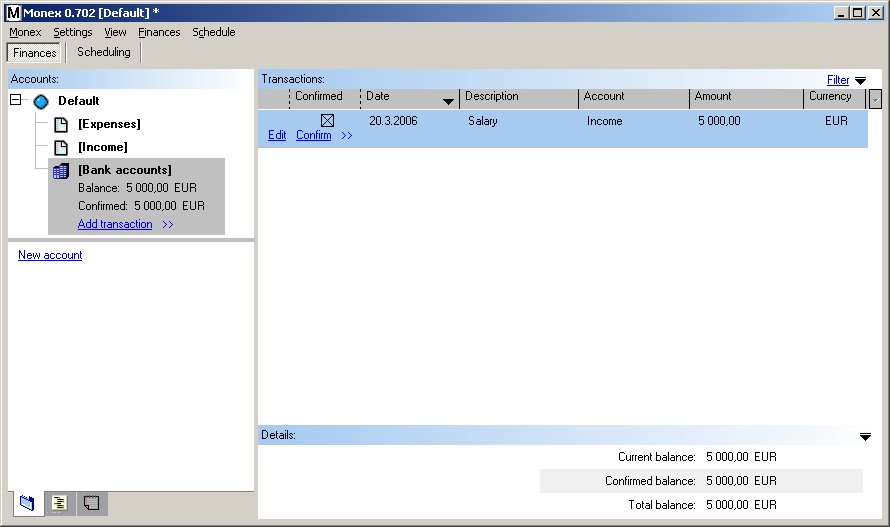
Monex Keeps Tracks of Your Incomes and Expenses:
The Monex personal finance manager can be downloaded on your computer and can be effectively used to deal with your transactions. By using Monex, you will come to know on what you are spending your money on and from where you are receiving money. The simple interface of the application will let you help you in making full use all the features of Monex. If you want to keep track of your expenses through Twitter, you can use TweetWhatYouSpend.
Here are the features of Monex:
- It lets you organize all your accounts in an easy-to-view tree structure. Your accounts can then be branched according to currency or its type such as expense account or income account.
- You can edit the tree structure of your account whenever you want as per your needs.
- You can see the balance of a single account or the total balance of all your accounts. You can see the profits you have made from stocks and funds.
- You can evaluate your expenses and incomes by going through the list of transactions and transaction history.
- The powerful filter feature will let you calculate your transactions by filtering transactions as per your requirement.
- Calculating and dealing with multiple currencies and checking exchange rates can be done easily.
- You can schedule transactions and then rely on Monex to remind you about it.
- You can organize transactions in your own categories.
If you want to track your expenses online, you can use Xpenser.