Listary is a free software to find files on your PC. This is one of the few file finding software that supports search as you type feature. This application is in tune with need for those who find it really messy to search for particular file among numbers of unmanaged files.
What makes it so useful and fast? The answer is simple, you need not write particular name of the file. Just type few characters or any part of the name of the file that you recall and Listary search for you simultaneously as you keep typing, making all the files available for you at a click.
Some other free desktop search software that we reviewed earlier include InSight Desktop Search, Copernic Desktop Search, and DocFetcher.
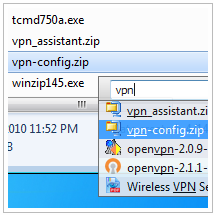
Listary performs search by conventional methods like leading string search, wildcards and auto complete. But, Listary can also be named as smart search application which supports all the top-end features which you expect from a search engine. It supports keyword search, multiple keyword support and highlight keywords. Listary also loaded with other features like text editing, folder categorization and many others.
There are various components listed in Windows explorer, registry editor, your desktop which is often messed up. And you really need a handy tool that narrows this huge list for you. Listary is handy tool for you in this regard.
Some of the features of Listary:
- Use of Wildcards: you can use ‘*’ and ‘?’ for traditional search. The scope of using wildcards is very wide, as you use and experiment the more you get to learn.
- Export list contents in a CSV file to enable viewing in Excel.
- Go to your favorite folders in a click by customizing your shortcuts.
Listary is very useful and easy to use. It also facilitates its users to create shortcuts and customize hot keys. By customizing shortcuts you can easily find your file from large lists. Shortcuts to command window is also possible by Listary. You can call command window from whichever directory you are in from Listary by just typing ?cmd? and command window will open in that window. You can also change your directory similarly by typing ?cd?
Listary is just a search tool so you don’t get interface to handle, but a search bar. You can hide this bar for your convenience or when you don need it. It provides you power to alter the search results as per your need like number of results you want to see in drop down menu, size, color, fonts appearing in the drop down menu. You can also vary opacity of the results in drop down menu.
You can also try Google Desktop Search, and Hulbee Desktop, and Exalead Desktop Search Engine.
