BingRounder is a free software that picks the daily image featured on Bing homepage and set it as your desktop background. It also provides a customization option to save these daily images to your system so that later, you may set them as your desktop wallpaper using some third party background changer.

How can I set Bing Images as my Desktop Background?
Bing upload really nice images on its homepage everyday. You can set these images as your desktop background if you want. All you need to do is to download and install BingRounder and it will do the task for you. BingRounder automatically grabs the daily image from Bing and set it as your desktop background. It’s already customized to run on startup. So it daily picks images from Bing homepage and automatically set it as your desktop background, everyday you turn on your computer.
Features of BingRounder:
- Automatically set Background Wallpaper: BingRounder automatically change your background wallpaper. You don’t need to change it manually through the personalization panel.
- Picks Daily Image from Bing: It grabs the featured image from Bing homepage daily, and set it as your desktop background.
- Customization Settings:
- Background Style: You can choose any of the background style options: Centered, Stretched, or Tiled.
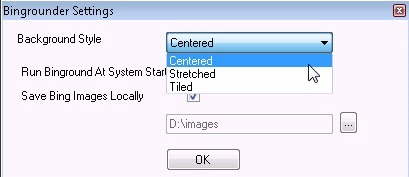
- Run at Startup: By default, BingRounder is customized to run whenever the system starts. It runs every day you start your computer and changes the desktop background. If you really like some image and want to keep it as your desktop background for some more days, you can stop BingRounder to run at system startup and prevent it from changing your desktop background, the very next day you start your computer.
- Save Bing Images Locally: BingRounder offers to save each image that it picks from Bing, locally to your system. You can save these beautiful images and use them later. We have previously covered articles on free image editors which offers some really nice image filters. You can use these image filters to give a new look to these images.
Final Verdict:
BingRounder is a good software to automatically change your desktop wallpaper on daily basis. Its quite useful if you want to set those beautiful Bing images as your desktop background. The software is quite simple in terms of what it does, but I am really impressed by the fact that someone thought of making such software.