The popular WebMD app is now available for Android. This is an official WebMD app for Android. WebMD lets you search medical information related to your health. This Android app offers a simple UI to check for health related information on Android.
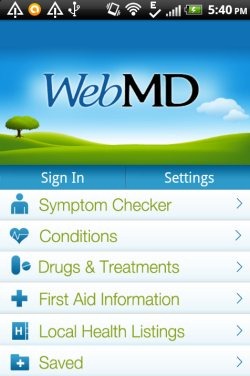
The app provides multiple tabs which include Symptom checker, conditions, drugs & treatment, first aid information, and local health listings. You can save your health information, and create your custom profile. To do this, you need to first sign-up with WebMD.
Let’s discuss about various features of WebMD for Android.
Symptom Checker:
Symptom Checker of the app allows you to check the disease or cause according to the symptoms you have. The symptom tab of the app allows you to check health information according to different parts of the body.
The good part of the app is that, it provides two-way checking for cause and the symptoms.
- You can select the body part from the image of whole human body. Just tap on the body part and you can have the cause or possible medical information related to that body part, and symptoms related to that cause.
- The other way is to select the body part name from the list of body parts and get the conditions and the overview of the symptoms. View the full overview of the cause, all the symptoms related to the cause. You can also read articles related to the cause.
Conditions:
Conditions part of the app tells you the whole overview according to the conditions you are facing. For e.g., if you are having Asthma, then select “Asthma” as the condition and you will have the full overview, symptoms, and related articles to Asthma. The conditions tab of the app is simple and easy to use and is really useful when you know about the condition or particular problem which you are facing.
Also check out free pregnancy apps for Android.
Drugs & Treatments:
Drugs & Treatments provides you information about different drugs and treatment. You can select any drug or treatment you want to and check the details or overview about that drug. Along with the details, the app also displays warnings, uses, side effects, precautions, interactions, overdose, and images. Smart search bar also helps you to search for any particular drug from the long list. This makes your search easier and faster. You even check the drug information according to the alphabet from which the name of the drug starts.
One of the best feature of Drugs & Treatments module of the app is that you can search the drug description by its shape, color, and imprint.
First Aid Information:
First Aid Information tab of the app allows you to check the first aid information which you should take during any mishappening. So, if you have WebMD installed on your Android phone, you don’t need a separate first aid app for Android. WebMD app provides the list of injuries and mishappening/causes against which you can check the first aid information. First aid information in the app is fully explained step by step. You can easily search by the name of the cause against which you want to have first aid information. First Aid information is displayed according to top searches and A-Z list.
Local Health Listings:
Local Health Listings shows all the nearest physician, pharmacy, and hospitals. The app is intelligent enough to track your current location and shows you the nearest medical center near to your location. The app uses your Android’s GPS to find the nearest medical centers. Also, if you don’t want the GPS to find location, then you can enter the area zip code manually and search for the nearest medical or health centers near to the area pin code entered.
Moreover, the app also allows you to add custom health tips and convert the app into custom app.
Install WebMD App:
Download and install WebMD app on Android from the link. You can also scan the QR Code below and install the app directly on your Android.

The official WebMD app is a nice app that lets you browse health information on Android. If you find anything missing in the app, then you can visit WebMD website.
Also, check out Weight Loss apps for Android.
