VIP Rumor Player combines the functionalities of a MP3 music player with internet radio streaming, all rolled up in a very simple, small, lightweight packaging. This music player is of course completely free, but there is a toolbar install prompt during installation, if you are not interested make sure to uncheck it before continuing.
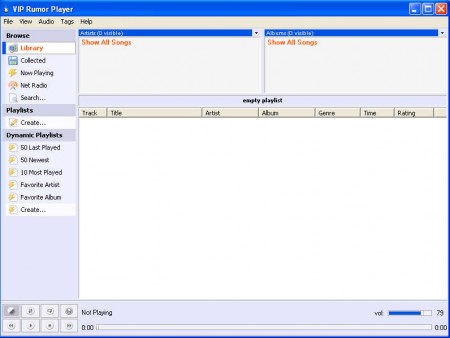
Interface design of VIP Rumor Player looks very modern, and also very different from what you would normally expect to see when someone says a music player. Winamp made us think that music players are supposed to have skins, which we can change to our taste, but somewhere underneath it all, there’s the basic interface, just like the one on VIP Rumor. You might think that skins which Winamp has are great, and that might be the case, but such additions can cost your computer a lot of RAM, and even processor time, for these reasons using VIP Rumor might be the way to go if you have an older computer for example.
Similar software: Danjukebox, Mcool, Boom Player.
Listen to your music library with VIP Rumor Player
To start listening, first you’re gonna have to add songs into VIP Rumor, and there are several ways of how you can achieve that. Either by:
- Adding song by song
- Loading entire folders
- Adding internet radio streams
There shouldn’t be any kind of problems with adding songs into VIP Rumor, simply click on File >> Library, and then choose from one of the three options above. List of supported formats is quite substantial, here are some of the more interesting which you’re probably using:
- .mp3
- .flac
- .wma
- .ogg
If you perhaps have songs in your collection which are in some other format, chances are that they can still be played inside this music player. It supports a total of 13 audio formats, you probably didn’t even know that so many of them exists.
Internet radio streaming with VIP Rumor Player
If you are looking for a simple way of how you can listen to online radio channels, the you should really try VIP Rumor. Adding a channel is as easy as clicking on File >> Library >> Add NetRadio.
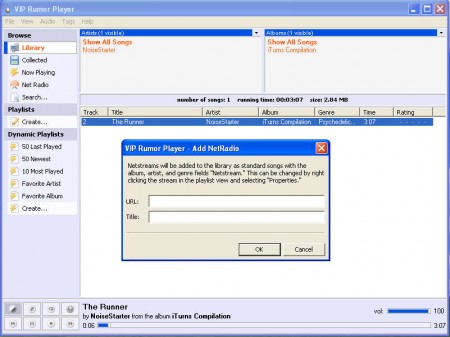
Like I said, adding online radios is very easy, once that you’ve selected the previous option, clicked on Add Netradio, enter the details of the radio that you wish to listen, and then simply click OK, it will appear on the list, just like a song, and you can easily switch between them.
Create dynamic playlists, to shake things up
Sometimes even if we load up our entire music database and we click on random, chances are good that we will come on the same song twice, or something else happening which will cause to to listen to all the same songs.
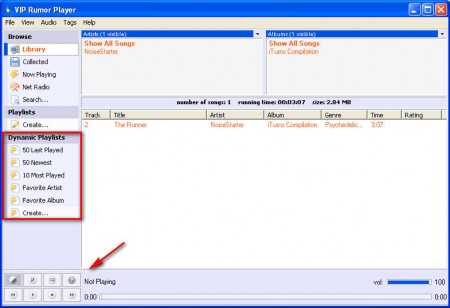
What you see above are options for generating random or should I say Dynamic playlists, these are special plalyists where you can place songs based on various conditions, so we have the:
- 50 Last Played songs – which will create a list of 50 songs last played
- 50 Newest – which play for you 50 newest songs added to the list
- 10 Most played – 10 songs which you’ve picked the most from the list
- Based on favorite artist, album
VIP Rumor Player is great music companion, and if you are looking for something new, make sure to try it out.
