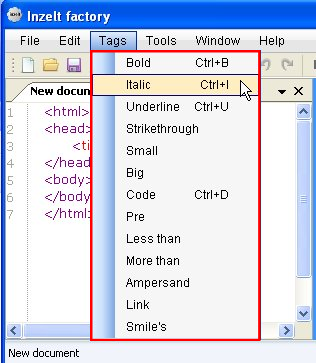
Inzelt Factory is a free HTML Editor for Windows, with WYSIWYG (What You See Is What You Get) support. It’s a handy and lightweight software that lets you easily create webpages by writing HTML code for them. Inzelt Factory is a multi-tabbed editor, which allows you to work with multiple programs together and provides a “Tags” menu to quickly insert useful tags in your code.
Earlier we have covered so many free HTML Editors, and Inzelt Factory is another add-on to the list, which comes with some really nice features like syntax highlighting, auto-complete, and live preview!
Before we move further and explore more features of Inzelt Factory, let’s have a look on the download and installation part of this free HTML editor.
Download and Install Inzelt Factory:
Inzelt Factory is a lightweight software; just 983 KB in size. It is available as an open source software on SourceForge and can be downloaded easily using the link given at the end of this article. Once you download Inzelt Factory, you can double-click on the setup file to run the installation wizard. This will guide you throughout the installation process and quickly install this free HTML editor in your system.
After proper installation, you can run Inzelt Factory to create webpages quickly and effortlessly. Let’s now see how you can use this free HMTL editor to create or edit webpages.
Create webpages using Inzelt Factory:
Inzelt Factory is pretty easy to use. The editor provides a user-friendly environment to write HTML code for multiple webpages together, and provides quick insert tags that reduces the need of remembering the language syntax as a whole.
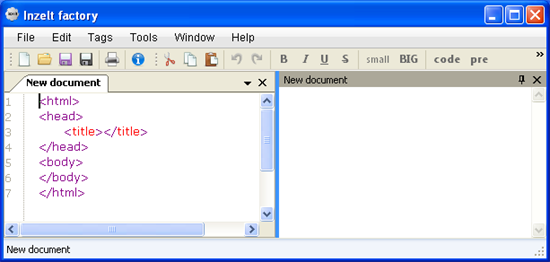
You can simply open a new HTML page and start writing whatever you want. The program window is divided into two section, the left part displaying the code window and the right part showing the preview of your webpage in real-time. The code window is assisted with features like line numbering and syntax highlighting to provide you with ease of work while writing code for your programs.
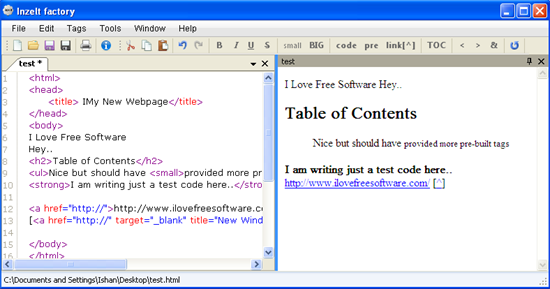
After finishing, you can test your code in your default browser and see how the results will look in real.
Now have a quick look on the key features of Inzelt Factory.
Key Features of this free HTML Editor:
- Free HTML Editor.
- WYSIWYG support.
- User-friendly interface
- Quick tag insertion.
- Live-preview.
- Syntax highlighting.
- Line numbering.
- Auto code completion.
- Undo/Redo.
- Cut/Copy-Paste.
- Multi-tabbed interface.
- Lightweight.
- Simple and handy.
The Final Verdict:
Inzelt Factory is a nice free HTML Editor, though it limit some of the features it says it has. First of all the quick tag insertion; it surely provides some pre-built HTML tags, but the list is quite small and not all of them are useful. Secondly, the auto-complete feature, I didn’t find anything happening like that during my testing, except for the ‘less than’ and ‘greater than’ signs.
So basically I can conclude that Inzelt Factory is very basic (not-so-powerful), and if you are not very well aware of the HTML basics and how-tos and looking for a good HTML editor, then you should go for some better alternatives like AceHTML or Kompozer. And if you want to check out Inzelt Factory at your own end, you can download it using the link below and try it out.
