Google Adsense is the most popular earnings source for bloggers and other websites. Google Adsense lets you view your earnings anytime by logging into Google Adsense website. However, some bloggers want to keep a more regular track of their Adsense earnings, without going to Google Adsense website all the time. Thankfully, there are many free adsense earning tracker software that let you monitor adsense earnings in an easy fashion.
SysSense:
This one is actually my favorite adsense earning tracker. I did a complete review of Sysense earlier. SysSense is a desktop Adsense earnings tracker. When you install on your PC, it sits in your taskbar. You provide your Google Adsense account information to it, and it keeps track of your Adsense earnings. To see your earnings, you just need to click on SysSense icon in taskbar. SysSense even lets you track multiple Google Adsense accounts together. Download SysSense here.
CSV AdStats:
This is another interesting free adsense earnings tracker, and adsense click tracker. It downloads data from Google Adsense on a regular basis in form of CSV file, and present that data to you in easy to understand form. It shows info like earnings, clicks, eCPM. Most importantly, it lets you generate different type of graphs to see how your earnings have changed over time. Download CSV AdStats here.
Apart from the desktop software mentioned above, I did not come across lot of other good free adsense earnings tracking software. Instead, I found lot of gadgets/plugins to track Adsense earnings. Here are different type of gadgets / plugins to track Adsense earnings.
Google Desktop Gadgets to Track Adsense Earnings:
Update (1-Sep-2012): Google Desktop has been discontinued, so all the gadgets mentioned below are no longer available.
Adsense Tracker: This is an easy to use Google Desktop gadget that shows you earnings for today, YTD earnings, and earnings for complete month. It does not have any fancy interface, and provides basic Adsense reporting easily. Try here.
Adsense Biff: This gadget shows your earnings for today, yesterday, and complete month. Try here.
Adsense Biff Pro: This one comes from the makers of Adsense Biff, and is one of the most advanced Adsense earnings tracker I have seen. It can show you regular statistics like eCPM, CTR, CPC, and earnings. Apart from that, it also generates various type of graphs from your Adsense data. Try here.
Windows Sidebar Gadgets to Track Adsense Earnings:
Adsense Reports: This Windows sidebar gadget for Google Adsense lets you check Adsense earnings quickly. It supports multiple Adsense accounts, and automatically refreshes to show latest earnings data. Try it here.
Adsensor: Adsensor is another Windows sidebar gadget to monitor Adsesne earnings. It comes with multiple backgrounds to change the look and feel of adsense monitoring gadget. Try here.
Adsense Gadget: This simple to use Adsense monitoring gadget that shows you earnings, clicks, and impressions. Try it here.
Yahoo Widgets to Monitor Adsense Earnings:
Update: (July 06, 2013) Yahoo! Widget Gallery has been discontinued. So the gadgets mentioned below are no longer available.
PubMatic HeadsUp Widget: Pubmatic HeadsUp Widget comes from Pubmatic, and you do not need to have Pubmatic account to use this gadget. It shows you earnings from Google Adsense, and ValueClick Media. Try here.
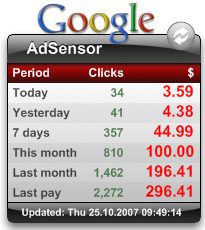
AdSensor: AdSensor is a nice looking gadget that shows adsense earnings and clicks for today, yesterday, 7 days, this month, last month, and last payment. Try here.
Google Adsense: This widget shows adsense clicks and earnings for today, and this month. Try here.
Firefox Plugins to Monitor Adsense:
Adsense Notifier: It displays adsense earnings on status bar of Firefox. Try here.
MoneyQuake: This is quite a feature rich plugin that displays real time earning statistics from various advertising programs, like, adsense, Bidvertiser, etc. Try here.
Google Adsense Checker: This is another Firefox plugin for Adsense that displays Adsense earnings in status bar of Firefox. Try here.
All these free Adsense monitoring software provide easy way to keep a regular track of your Adsense earnings.
