Kaseya is a free web service which you can use to administer computers remotely and offer IT support and troubleshooting over the internet. To use it, you’re gonna have to register on the Kaseya website after which you’ll be able to download the client application, the so called Kaseya Agent which has to be installed on the computers that you want to administer remotely. Remote computers are accessed through the web browser, and all that you have to do in order to actually access remote PCs is install a browser plugin on your end, the admin side.
Next to the free remote administration service that Kaseya offers there are also paid business and enterprise accounts which are gonna allow you to add more users to which you can offer remote support, and of course more administrators which are gonna be able to help solve problems more quickly. With the free account you get the following:
- Remote control monitoring for up to 25 computers
- Support for Linux, Mac and Windows
- Conduct video chats with your users
- Desktop access to the remote computers for easier support
- FTP access – for easier file transfer
- Screen previews – to check if the computer is being in use
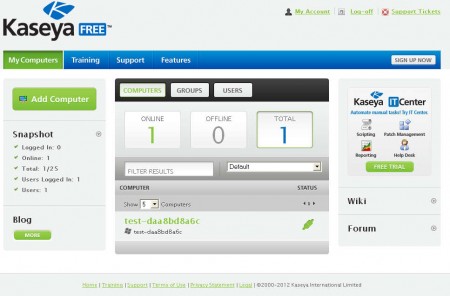
From the Kaseya main menu, which can be seen on the image above, you’ll have easy overview over the computers which you’re assigned to administer. At the center of the screen you’ll be presented with the total number of machines that you’re monitoring, and you’ll be able to see which ones are online and which ones offline. Down below there will be a detailed list of the machines that you can access, but before you see that, clients are gonna have to install the previously mentioned Kaseya Agent and also setup the browser plugin which is available for Firefox and Chrome.
Similar software: Online Support, Lite Manager Free.
How to setup and administer computers remotely with Kaseya
By clicking on the Add Computer button in the top left corner of the menu you’ll be able to download the application which your clients are gonna have to install on their computer. Installation is very simple, you just need to run the installer, everything will be configured automatically, and the Kaseya Agent is gonna start running in the system tray. At first it’s gonna have a white color, but when everything starts working OK, it’s gonna turn blue, and on the website your computer should appear in the list:
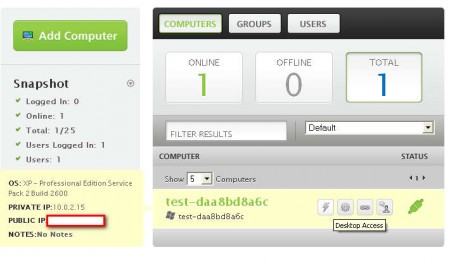
While hovering your mouse pointer over the list of computers where the client application is installed, you should see icons which can be used to open up the remote desktop interface, in a new tab. Clicking on any of them for the first time will prompt the browser plugin installation, after which you should be able to offer remote support to you customers or friends.
Conclusion
Remote Administration with Kaseya is very easy. Clients don’t have to have a lot of knowledge, you just give them the files and ask them to run it. Ports don’t have to be opened, firewalls shouldn’t have to be configured, so it’s perfect for all those who need help but who are not very apt with computers. Register and download the client app for free and see how it goes, if you’re not happy you can easily remove it.
