Amazifier is an easy to use free photo editor. This is a free photo editing software that you can download on your computer, and edit photos easily. It provides all the common photo editing operations like crop, rotate, red eye removal, change exposure, and more. Apart from that, it also comes with some uncommon options like change eye color, remove blemishes etc.
And the best part is that this photo editing software comes with a very intuitive interface which makes it very easy to use.
Amazifier also lets you open photos directly from Facebook, Flickr, or Picasa web albums, and then upload the edited photos back to these services directly.
Interface of Amazifier:
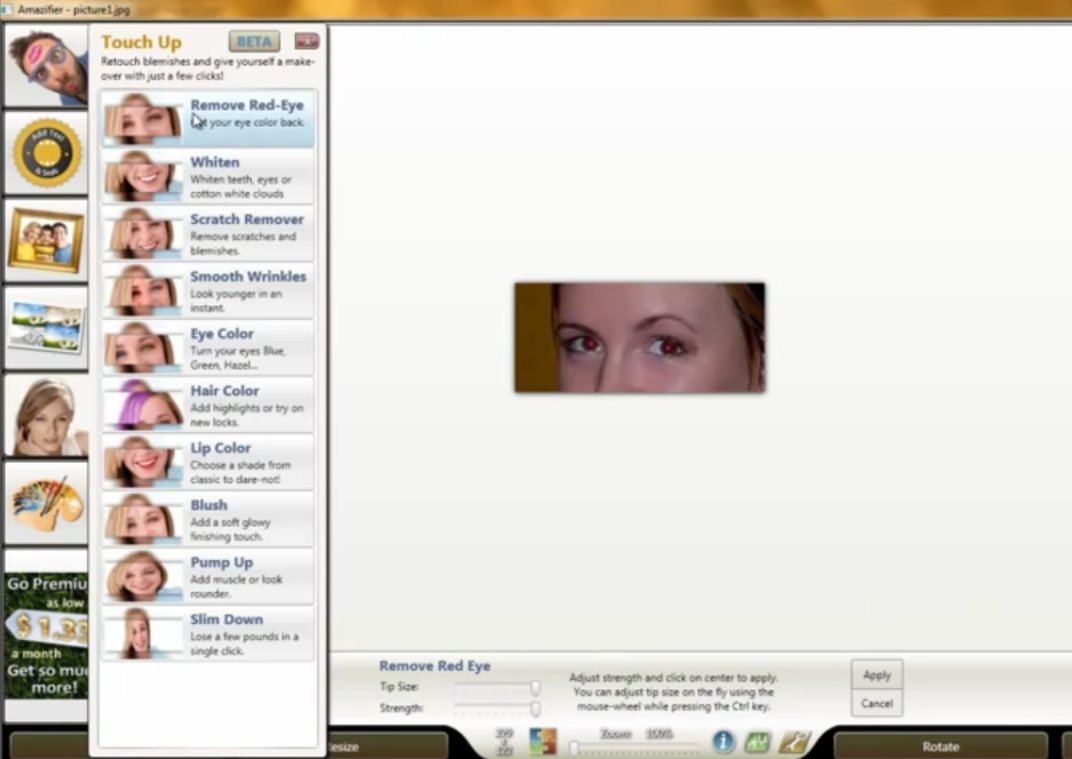
As I mentioned above, Amazifier comes with a very easy to use interface. It has a panel on the left side which groups operations that you can perform on your photos. Some of the operations include Touch Up, Frames, and Drawing. Clicking on any of these buttons show another panel that has all the operations under that group. For example, clicking on ‘Touch Up” brings up options like Remove Red eyes, Whiten etc.
Apart from that, Amazifier has a toolbar at the bottom that has common operations like Crop, Resize, Rotate, and Exposure. Apart from that, this toolbar also shows tools specific to the operation that you select from Left panel. For example, if you select “Exposure” option, this toolbar will start showing controls related to Exposure adjustment. This ensures that tools are displayed only when they are required, and interface does not becomes crowded by lot of toolbars displayed all the time.
Also check out Dropico, and CoMemories.
How to Use Amazifier:
Amazifier is quite easy to use. You start by selecting the photo that you want to edit. After that, just select the operation from the Left panel (or bottom toolbar) that you want to perform on your photo. Amazifier lists all the operations as big icons that has text name of operation also. So, it is very easy to find the option that you are looking for. Once you have selected the option, just use that on your photo to make corresponding edits. For example, if you select option for Red eye removal, you can just move your cursor over eyes in your photos to remove red eye.
Some of the Photo Editing Options Available in Amazifier:
- Here are some of the photo editing operations that you can do with Amazifier:
- Remove Red eye.
- Whiten teeth of your photos.
- Remove blemishes in the photos.
- Smooth Wrinkles of photos.
- Change eye color
- Change Hair Color
- Change Lip Color
- Add Blush
- Pump Up muscles to make them look rounder.
- Edit photos to make it look like you have lost a few pounds.
Apart from these photo editing options, Amazifier also lets you to:
- Create Framed Photos
- Add stickers to photos
- Add stamps and seals to photos
- Scribble over photos by using Drawing tools
- Add various photo effects.
All these features make Amazifier a full fledged photo editing software that can be used by anyone. I really like its focus on operations, instead of giving you basic controls to do everything yourself. For example, you can choose the option to Whiten teeth, and then Amazifier automatically takes care of all the necessary settings required to complete that operation. This makes it one of the easiest photo editing software, as compared to other free photo editing software. Some other popular photo editors that you can also try are Picasa, and Windows Live Photo Gallery.
Amazifier comes with a paid version as well that lets you get even more stickers etc., and does not shows any ads or watermarks over photos. But I believe the free version is good enough for most of the users for any basic photo editing.
Download Amazifier free.
