FoxTag editor is a free tag editing software for your music files. Coming to the ID3 tags, you could enter the details like artist, title, album, genre, year, comments etc. With proper tagging you can make your music files look way much better.
Having many music files without proper name and tag could be really frustrating when you set out to search for a particular file and FoxTag Editor could offer great help in managing this effectively. The pretty graphical user interface and the clearly defined icons are the biggest strengths of this free tag editor. With this software you could complete all the ID3 tag fields for each of your song.
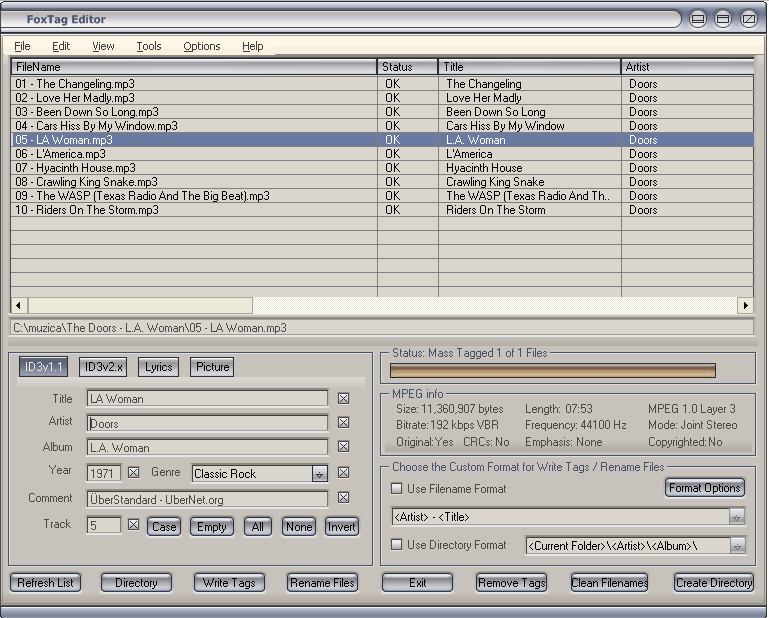
Taking the case of not having any substantial info on the file, you can download the ID3 tag information from the internet. Amazon or FreeDB would be ideal place for finding such files. Not just importing, you could export the tag information for a future reference or backup. While importing, it’s usually stored as a CSV file.
Also Read: Free Software to Automatically Add ID3 Tags
Besides tag editing there are other few exciting features attached with the FoxTag editor. You can create playlists, organize folders and rename files if you want. You can also export the data to various other formats. The cool graphical user interface is going to help you in this. You might be surprised to learn that you can play or queue up files in Winamp with the help of FoxTag editor.
Also, it supports wide range of files for the tagging, such as MP3, WAV, FLAC, APE, MPC, WMA, OGG, WV, M4A, AAC etc. You will be able to work with all these different formats at the same time. With an excellent navigation and the very cool buttons and layout this free tag editor is one of the best tag editors. Some other tag editors we reviewed earlier include Hanso Tagger, and TuneUp Alternative.
After installation you can register this software online. Click on the HELP button and get a new registration code. Enter this registration code which you have got in your email and the software will be registered online.
Categorizing your music has become lot easier with FoxTag editor and who likes to have a disorganized music collection for that matter.
