Syncless is a tool which allows users to keep multiple folders in sync. You can even keep their folders across multiple computers in sync.
Nowadays, even average computer users work on several computers. That said, sooner or later syncing the content of your folders will be necessary.
Of course, one might always use networks to manually send files. However, that’s a slow process. That’s when Syncless will come in handy.
With it’s original tagging feature Syncless will make this time consuming process way faster and easier. The tagging feature lets you tag the folders that you want to keep in sync, and syncless will keep them in sync in real time. Tagging feature is even more intuitive than folder pairing feature offered by popular syncing tools like Microsoft Sync, SyncToy, and Synchredible.
As if it’s not enough Syncless requires no installation and it’s a light program. In other words, you can carry Syncless in your pen Drive and automatically sync your folders whenever you plug your pen drive and open Syncless.
Syncless is an essential software for those who use multiple computers and are usually short of time or those who just want to save their precious time.
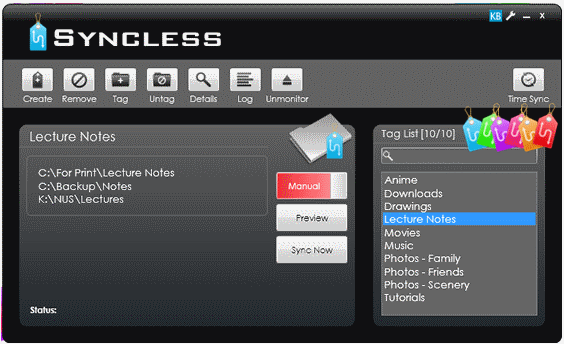
How to Use Syncless to Keep Data in Sync Across 2 Computers:
Using Syncless is incredibly simple. After the download is done simply unzip it in a specific folder, it’s also advised that you transfer it to a pen drive or any other USB mass storage device.
When you open the program there should be 2 main panels: One on the right with the tag list and the other with the folders you want to sync. In order to create a tag simply click the “Create” button which should be the first button on the buttons panels.
After you’re done creating your tags highlight the tag you want then drag and drop the desired folder to tag it accordingly. Once that’s done click the “manual” button to change it to “seamless”.
By doing that Syncless will automatically sync your folders once you start the program. Alternatively, you can set it to manual, which should be the default option and click “Sync” whenever you want to sync your folders.
Features of Syncless:
- Quickly sync your folders.
- Unique tag system.
Other file syncing tools that you can also try are: FAST, PureSync, and File Synchronizer.